
 English
 Nederlands
 Français
 Deutsch
 Italiano
 Español
 Português
Read exported WhatsApp chats clearly and easily
chatexportviewer is a free, user-friendly Windows application for reading, searching, and managing exported WhatsApp chats. Open WhatsApp export files from folders or ZIP archives, filter media, and export pages to PDF.
Online version available in October 2026
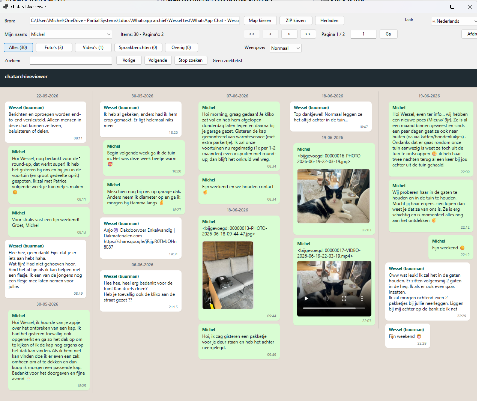
A free and user-friendly way to read exported WhatsApp chats
chatexportviewer is designed to make exported WhatsApp chats easy to read, search, and browse in a clear and structured way. Instead of dealing with one long plain-text export, you get a calm multi-column view that helps you quickly find what you need.
Open WhatsApp export files from a folder or ZIP archive, browse large chat archives, filter media, and export selected pages or complete conversations to PDF.
Why users choose chatexportviewer
- Free to download and use
- Read exported WhatsApp chats in a clear layout
- Easy to use, even with large chat archives
- Search quickly in messages, senders, and attachments
- Supports both old and new export files
- PDF export in a fixed, readable layout
Feature overview
Export chats to PDF
chatexportviewer lets you export chat content to PDF in a way that closely matches the on-screen layout.
- Export the current page
- Export a selected page range
- Export the full archive
- Preserve layout, colors, and message positions as accurately as possible
Ideal for documentation and archiving
PDF export is especially useful when you want to preserve important conversations, prepare structured documentation, or share chat pages in a consistent visual format.
One application, multiple languages
chatexportviewer includes built-in multilingual support and does not require separate versions for different regions.
- English
- German
- French
- Italian
- Dutch
- Portuguese
- Spanish
Flexible and future-ready
The selected language can be changed at any time within the application and is automatically remembered for future use.
Frequently asked questions
Is chatexportviewer free?
Yes. chatexportviewer is free to download and use.
Does chatexportviewer work with ZIP files?
Yes. You can open exported WhatsApp chats from folders or ZIP archives.
Can I export WhatsApp chats to PDF?
Yes. You can export the current page, a selected page range, or the full archive to PDF.
Is my data uploaded?
No, NEVER! Everything stays on your own computer and is not uploaded.
Useful for personal, professional, and archive use
chatexportviewer is suitable for anyone who wants to read and preserve exported WhatsApp chats in a clear and structured way.
Common use cases
- Personal chat archiving
- Preserving family conversations and memories
- Viewing photos, videos, and voice messages
- Preparing structured PDF documents
Professional use
- Administrative documentation
- Reviewing business communication
- Research and historical reference
- Organized record keeping
Download chatexportviewer
Get started with a free and easy way to read and manage exported WhatsApp chats. Open, browse, search, filter, and export your archives in one simple Windows application.